New Feature: Custom Follow-Up Emails
Aura Cure now lets acupuncture and TCM clinics send branded follow-up emails after each visit—complete with your Google review link, home-care reminders, and a one-click path to book the next appointment.
Why follow-up emails matter for TCM clinics
Definition: A follow-up email is an automated message sent after an appointment to reinforce the treatment plan, invite the patient to take a next step, and keep your clinic top of mind between visits. For acupuncture and Traditional Chinese Medicine (TCM) practices, the window right after a session is when patients best remember self-care instructions—and when they are most willing to leave a review or book again.
Until now, many clinics copied the same generic message into a separate tool or skipped post-visit email entirely. That meant lost Google reviews, forgotten home exercises, and extra front-desk calls to rebook. With Aura Cure’s new custom follow-up email feature, you design templates once inside your EMR and let the system send them on your schedule—no juggling spreadsheets or third-party mail merge.
What you can customize
Each template is yours to edit. Common blocks clinics add include:
- Google review link — paste your Google Business Profile “Ask for reviews” URL so happy patients can share feedback in one tap.
- Home-care reminders — acupressure points, dietary guidance, stretch routines, or herb timing from the visit Plan.
- Rebooking CTA — link to your online scheduling page or patient portal so the next visit is easy to secure.
- Clinic branding — logo, signature, phone number, and parking or location notes.
- Educational links — point patients to your blog articles or care sheets for conditions you treat often.
- Multilingual snippets — welcome lines or key instructions in English plus a second language your community speaks.
You can maintain different templates for first visits, follow-ups, fertility support series, or maintenance care—so messaging stays relevant instead of one-size-fits-all.
Adding your Google review link the right way
Online reviews help acupuncture and TCM clinics compete in local search and build trust with new patients. The best time to ask is shortly after a positive experience—when relief from pain, better sleep, or improved digestion is still fresh.
How to get your review URL
In Google Business Profile, open your listing → Ask for reviews → copy the short link Google provides. Paste that URL into your Aura Cure follow-up template as a clear button or linked text such as “Share your experience on Google.”
Tips that improve response rates
- Keep the ask friendly and optional—thank patients for choosing your clinic first.
- Send after visits where the patient reported improvement, not after difficult conversations.
- Place the review link after home-care content so the email feels helpful, not transactional.
- Track which template version you used so you can refine wording over time.
How to set it up in Aura Cure
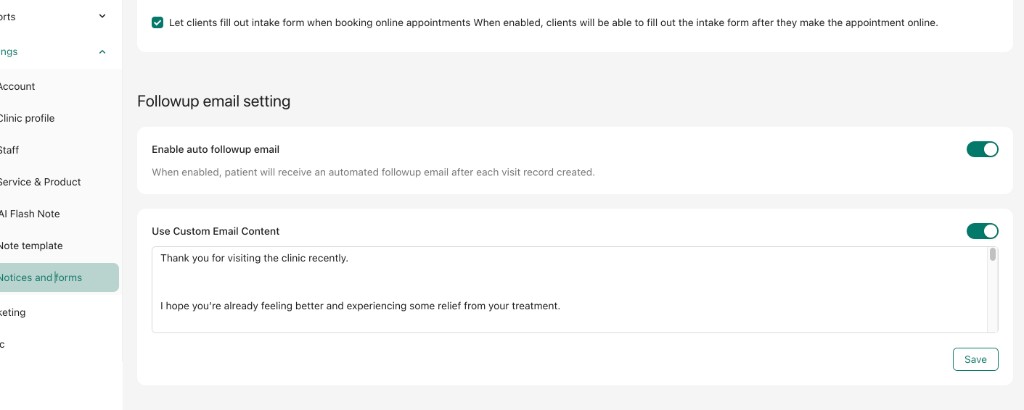
Open Settings → Notices and forms → Followup email setting. Turn on Enable auto followup email so patients receive a message automatically after each visit record is created. Then enable Use Custom Email Content and write your template in the editor—thank-you note, home-care reminders, Google review link, and rebooking CTA all in one place. Click Save when you are done.
Follow-up emails connect to the same patient record you already use for appointment scheduling and SOAP documentation. A typical day looks like this:
- Complete the visit and sign the chart in Aura Cure.
- The system queues a follow-up email based on your clinic’s timing rule (e.g., 3 hours later or next morning).
- The patient receives your custom template with review link, care tips, and booking button.
- Front desk sees fewer “what was that point again?” calls—and more online bookings without manual outreach.
Because templates live inside your EMR, updates apply everywhere instantly when you change hours, add a practitioner, or refresh your Google listing URL.
Privacy and compliance reminders
Email is a convenient channel but not a substitute for your secure chart. Best practice: keep follow-up messages focused on general instructions, scheduling, and public links. Avoid detailed diagnoses, lab values, or other protected health information (PHI) in email body text when you can place clinical detail in the patient portal instead.
Aura Cure is built with HIPAA, PIPEDA, and GDPR-oriented controls for clinical data. Pair smart email content with your existing consent and communication policies. Learn more on our Privacy Policy page and compliance overview.
Key takeaways
- Custom follow-up emails keep patients engaged between acupuncture and TCM visits.
- Add your Google review link directly in the template to grow local reputation.
- Combine home-care reminders and rebooking links in one automated send.
- Use multiple templates for different visit types instead of a single generic message.
- Keep email content general; reserve detailed PHI for secure chart and portal workflows.
Frequently asked questions
Can I add my Google review link to Aura Cure follow-up emails?
Yes. Paste your Google Business Profile review URL into any follow-up template. Patients receive a direct link after their visit—no extra tools required.
What else can I include besides the review link?
Home-care instructions, acupressure or lifestyle tips, links to book the next appointment, clinic contact information, and links to educational content on your website or blog.
When are follow-up emails sent?
You control timing at the clinic level—many teams choose a few hours after checkout or the following morning so patients read the message when they are planning their week.
How do I get started?
Log in to Aura Cure, go to Settings → Notices and forms → Followup email setting, enable auto follow-up and custom content, then save your template. New to Aura Cure? Start a free trial or watch the demo videos.
Try custom follow-up emails in Aura Cure
Built for acupuncture, TCM, and RMT clinics—AI SOAP notes, scheduling, patient records, and now customizable post-visit emails with Google review links.
Start Free Trial