Informed Consent, Finally Built for Multi-Modality Clinics
Multi-therapy clinics often rely on one generic consent block. Aura Cure now lets you maintain treatment-specific templates, select the forms that apply at intake, and capture one Patient Portal signature—with wording snapshotted for cleaner records.
The paper chase multi-modality clinics know too well
If your clinic offers TCM, acupuncture, RMT, physiotherapy, osteopathy, or chiropractic under one roof, a single catch-all consent paragraph rarely matches what the patient is actually receiving. Paper and scanned PDFs are hard to file—and harder to prove which version was signed when wording changed six months later.
Intake asks patients to sign, while staff still chase missing forms inside the EMR. That broken handoff costs front-desk time and leaves gaps in the chart. Multi-template consents in Aura Cure are designed to help clinics organize informed consent more clearly across treatments—not to replace clinical judgment or legal review.
What’s new
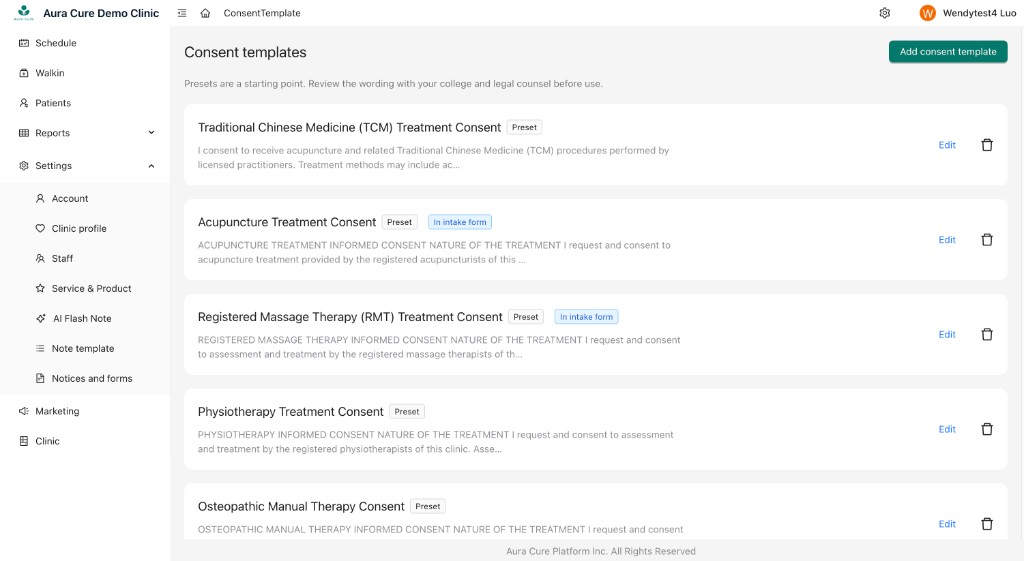
- Multiple editable consent templates per clinic—by treatment type (TCM, acupuncture, RMT, physio, osteopathy, chiropractic) or custom forms you create.
- Pick which forms apply at intake so each visit’s package matches the care planned that day.
- Patient Portal: patients check “I have read and agree” on each selected form, then submit one Type or Draw signature that covers them all.
- Wording is snapshotted at signing (with version), so later template edits do not rewrite history.
- Consents on the patient profile, with PDF and intake views for staff review.
- Legacy-friendly: clinics can still fall back to the previous single intake consent text when needed.
Why it matters for clinic operations
Multi-modality clinics can match consent to the treatment instead of one vague block. Starter templates cover common informed-consent elements—nature of treatment, risks, alternatives, voluntariness, and the right to withdraw—as a starting point for your clinic to adapt, not as legal advice or a guarantee of regulatory compliance.
Patients sign in the intake / portal flow, which means less front-desk chase after the appointment starts. The audit trail is clearer: who signed, when, which forms, and which wording. That pairs with the same digital intake and informed consent conversation habits your team already uses.
What patients see on the portal
- Open the intake or Patient Portal link.
- See one or more consent forms your clinic enabled for that visit.
- Check “I have read and agree” on each form.
- Type or draw a signature once and submit.
- Clinic staff can review the records and PDFs immediately on the patient profile.
One signature covers every form selected for that intake—so patients are not asked to sign the same name five times for related modalities.
How clinics turn it on
- In Aura Cure EMR, open Settings → Notices and forms → Consent templates.
- On first visit, Aura Cure seeds starter templates you can edit.
- Enable the templates that should appear on Intake.
- (Optional) Keep your existing intake consent wording as the default TCM or primary form.
- Send a real intake / portal link and smoke-test before rolling out clinic-wide.
EMR and Patient Portal share the same templates and signed records—so front desk, practitioners, and patients are not working from different copies.
Before vs after
| Before | Now |
|---|---|
| One vague block of text | Treatment-specific templates |
| Hard to prove which version was signed | Snapshot + version at signing |
| Paper / scattered files | Intake + patient profile in one place |
Scope and boundaries
Starter copy is oriented toward common BC and ON informed-consent elements so Canadian multi-modality clinics have a practical baseline. It is not legal advice. Before relying on any template in production, adapt it with your provincial college requirements and, when needed, legal counsel.
Aura Cure helps clinics organize consent more clearly; it does not claim that any clinic is fully compliant with every regulation by using the feature alone. Pair templates with good clinical conversations and your existing privacy and privacy checklist practices.
Key takeaways
- Maintain multiple treatment-specific consent templates in Settings.
- Select which forms apply per intake; patients agree once on the portal.
- Signed wording is snapshotted with version for clearer records.
- Consents live on the patient profile with PDF / intake views.
- Starter templates are editable starting points—not legal advice.
Frequently asked questions
What is multi-template informed consent?
It lets your clinic keep separate consent forms by treatment type, enable the ones needed for intake, and collect agreement plus one signature on the Patient Portal.
If we edit a template later, does the old signature change?
No. Aura Cure stores a snapshot of the wording and version at the moment of signing.
Can we keep our old single consent text?
Yes. You can fold existing wording into a primary template, or fall back to the previous single intake consent display when that still fits your workflow.
How do I get started?
Log in to Aura Cure → Settings → Notices and forms → Consent templates. New clinic? Start a free trial or watch the demo videos.
Turn on multi-template consents in Aura Cure
Already on Aura Cure? Open Settings and enable the templates for intake. New clinic? Try EMR free—AI SOAP notes, scheduling, digital intake, Patient Portal, and clearer consent records in one place.